Data Science & Python

1. Brief Introduction

One of the major roles of a data scientist is to provide analysis and modeling that helps the team directly improve the product. With the fast developments in Machine Learning, an applied data scientist applies Machine Learning to data science to build greater tools based on big data.

Many solid tools support data scientists to do that so that the built products could be scalable and also reusable for different projects/products. Especially, by combining deep learning tools (Keras/Tensorflow) and scalable computing environments (Spark/PySpark), we can build large-scale data products with smaller team sizes when reducing the need for data engineers and Machine Learning engineers.

Why Python for Data Science

  1. Variaty of useful tools: Flask (Web Framework + server), Bokeh (visualizations), Jupyter (notebook).

  2. Machine Learning / Deep learning: Framworks like TensorFlow/Keras, PyTorch, scikit-learn.

  3. Spark / PySpark: Easy to learn and work with Spark

  4. Many products using Python and large community for support

Cloud Platforms

There are several cloud platforms such as Amazon Web Services (AWS), Google Cloud Platform (GCP), and Microsoft Azure.

  1. Amazon Web Services (AWS)
  • Data lake: store on S3 and use tools such as Athena; Redshift: columnar database for data warehouse
  1. Google Cloud Platform (GCP)
  • Dataflow: can combine many components for building batch and streaming data pipelines which are scalable and robust with less effort and suitable for teams of small size. It supports PubSub for messaging, BigQuery for the analytics data store, and BigTable for databases. It also follows Apache Beam Concepts which help to focus on only the logical composition of data processing jobs and easy to move between different platforms.

Data Lake vs Data Warehouse

Data Lake Data Warehouse
Structure All kind of Raw Data Cleaned and structured Data
Purpose Long-term storage In use or ready to use
Users Data Analytist and Scientists Business
Access Cheap, Highly accessible and quick to update More complicated and costly to make changes
Data processing ELT (Extract Load Transform) process Traditional ETL (Extract Transform Load)
Key Benefits Access data before it processed => get to their result more quickly to new questions Worked well for pre-defined questions about reports and performance metrics

In this project, I will work on GCP which provides \$300 free credit in 91 days.

2. MLflow & Pre-trained Model

It’s more common to train models in a separate workflow than the pipeline used to serve the model.

We can save and load both scikit-learn and Keras models, with both direct serialization and the MLflow library.

pickle

import pickle
pickle.dump(model, open("pre-trained-model.pkl", 'wb')) # save trained model
model = pickle.load(open("pre-trained-model.pkl", 'rb')) # restore to predict new values

Keras library

model = models.Sequential()
model.compile()
model.save("games.h5")

from keras.models import load_model
model = load_model('games.h5')

MLflow

MLflow is a broad project focused on improving the lifecycle of machine learning projects.

########## sklearn #############
import mlflow.sklearn
model_path = "models/logit_games_v1"
mlflow.sklearn.save_model(model, model_path)

loaded = mlflow.sklearn.load_model(model_path)

########## Keras  #############
import mlflow.keras
model_path = "models/keras_games_v1"
mlflow.keras.save_model(model, model_path)

loaded = mlflow.keras.load_model(model_path)

upgrading setuptools pip3 install --upgrade pip setuptools

tf.Graph

TensorFlow uses graphs as the format for saved models when it exports them from Python.

With a graph, we have a great deal of flexibility. We can use TensorFlow graph in environments that don't have a Python interpreter, like mobile applications, embedded devices, and backend servers.

Graphs are also easily optimized, allowing the compiler to do transformations like:

  • Statically infer the value of tensors by folding constant nodes in the computation ("constant folding").
  • Separate sub-parts of a computation that are independent and split them between threads or devices.
  • Simplify arithmetic operations by eliminating common subexpressions.

3. SQL & dataframe_sql

Using SQL to work with Dataframes versus specific interfaces, such as Pandas, is useful when translating between different execution environments. Team members could quickly review and understand the programming logic.

pip install dataframe_sql

sudo yum install gcc
sudo yum install python3-devel
pip3 install framequery
pip3 install fsspec
pip3 install featuretools

4. Conda & Jupyter

I prefer Conda to set up Python and its packages. Download at https://www.anaconda.com/products/distribution

wget https://repo.anaconda.com/archive/Anaconda3-2022.10-Linux-x86_64.sh
bash Anaconda3-2022.10-Linux-x86_64.sh
# reboot or reload bash shell
conda create --name datascience python=3.9
conda activate datascience
conda install jupyter
jupyter notebook --ip 172.31.25.7

To run as background service, use nohup:

nohup jupyter notebook --ip 172.31.25.7 --notebook-dir ~/codes/ &

To kill/stop jupyter server:

ps -a | grep jupyter
kill -9 ID

Note: Activate the env of conda before running jupyter

5. Web Services

We can create a web service to serve the model. The server could be Flask for quick testing/development and add Gunicorn for well support web server (WSGI HTTP Server).

pip3 install  requests==2.23.0 
pip3 install  Flask==1.1.4 
pip3 install  gunicorn==20.1.0  
pip3 install  mlflow==1.25.1   
pip3 install  pillow==9.1.0
pip3 install  dash==2.3.1

python code: echo.py

import flask
app = flask.Flask(__name__)

@app.route("/", methods=["GET","POST"])
def predict():
    return flask.jsonify({"Working":True})

if __name__ == '__main__':
    app.run(host='0.0.0.0')

Start server with Flask

python3 echo.py

Start with Gunicorn

gunicorn --bind 0.0.0.0 echo:app

If running Gunicorn in a container environment, there is a couple of issues needed taken care of. Read more here

6. Google

BigQuery to Pandas

pip3 install google-cloud-bigquery==3.0.1

Locate credential JSON file for GCP

os.environ['GOOGLE_APPLICATION_CREDENTIALS'] = '/home/ec2-user/newacc_gcp_credential.json'

Run demo

from google.cloud import bigquery
client = bigquery.Client()
sql = """
  SELECT * 
  FROM  `bigquery-public-data.samples.natality`
  limit 10
"""

natalityDF = client.query(sql).to_dataframe()
natalityDF.head()

google-cloud-sdk

Link https://cloud.google.com/sdk/docs/install#linux

We can use conda to install this library

conda install -c conda-forge google-cloud-sdk

To configure, log in, and initialize, following bellow to download the credential JSON file.

In this case, project name and project ID are scalable-model-piplines

I create new project and assign to a new account and generate credential JSON file for this project.

gcloud config set project scalable-model-piplines
gcloud auth login
gcloud init
gcloud iam service-accounts create newacc 
gcloud projects add-iam-policy-binding scalable-model-piplines --member "serviceAccount:newacc@scalable-model-piplines.iam.gserviceaccount.com" --role "roles/owner"
gcloud iam service-accounts keys create newacc_gcp_credential.json --iam-account newacc@scalable-model-piplines.iam.gserviceaccount.com
export GOOGLE_APPLICATION_CREDENTIALS=/home/ec2-user/newacc_gcp_credential.json

Make sure this file is only read by owner

chmod 400 newacc_gcp_credential.json

7. PySpark

Spark is a general-purpose computing framework that can scale to massive data volumes. It builds upon prior big data tools such as Hadoop and MapReduce while providing significant improvements in the expressivity of the languages it supports. One of the core components of Spark is resilient distributed datasets (RDD), which enable clusters of machines to perform workloads in a coordinated and fault-tolerant manner. In more recent versions of Spark, the Data frame API provides an abstraction on top of RDDs that resembles the same data structure in R and Pandas.

PySpark is the Python interface for Spark, and it provides an API for working with large-scale datasets in a distributed computing environment. PySpark provides a nice balance between expressive programming languages and APIs to Spark versus more legacy options such as MapReduce.

By using PySpark, we've been able to reduce the amount of support we need from engineering teams to scale up models from concept to production.

Scalability

While we are able to scale up models that serve multiple machines using Lambda, ECS, and GKS, these containers worked in isolation and there was no coordination among nodes in these environments. With PySpark, we can build model workflows that are designed to operate in cluster environments for both model training and model serving.

Usually, libraries like sklearn are used to develop models, and languages such as PySpark are used to scale up to the full player base.

Pandas dataframes

When we use toPandas or other commands to convert a dataset to a Pandas object, all of the data is loaded into memory on the driver node, which can crash the driver node when working with large datasets.

Pandas UDF

Pandas UDFs are user-defined functions that are executed by Spark using Arrow to transfer data and Pandas to work with the data, which allows vectorized operations. Pandas UDFs can be used with PySpark to perform distributed-deep learning and feature engineering.

Lazy Execution

In PySpark, the majority of commands are lazily executed, meaning that an operation is not performed until the output is explicitly needed. While working with Spark Dataframes can seem to constrain us, the benefit is that PySpark can scale to much larger datasets than Pandas.

Spark deployment

  • Self-hosted: An engineering team manages a set of clusters and provides console and notebook access.
  • Cloud solutions: AWS provides a managed Spark option called EMR and GCP has Cloud Dataproc.
  • Vendor solutions: Databricks, Cloudera

Using a distributed computing environment means that we need to use a persistent file store such as GCS/S3 when saving data. This is important for logging because a worker node may crash and it may not be possible to ssh into the node for debugging. While PySpark can work with databases such as Redshift, it performs much better when using distributed file stores such as S3 or GCS.
8. Data Storage

File formats

When using S3 or other data lakes, Spark supports a variety of different file formats for persisting data.

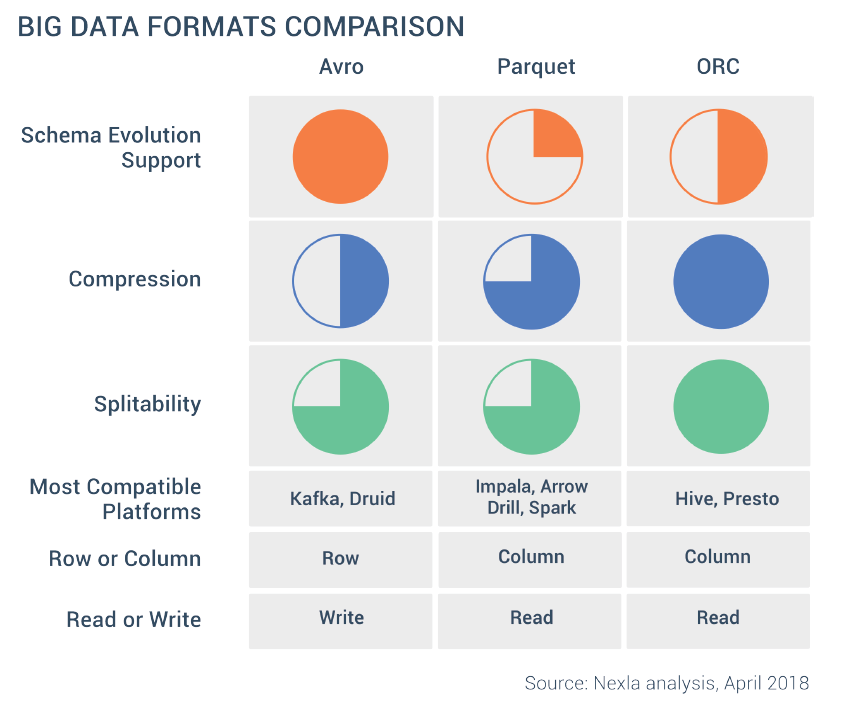
Parquet is typically the industry standard when working with Spark

When working with large-scale datasets, it’s useful to set partition keys for the file export using the repartition function. When persisting data with PySpark, it’s best to use file formats that describe the schema of the data being persisted.

Avro

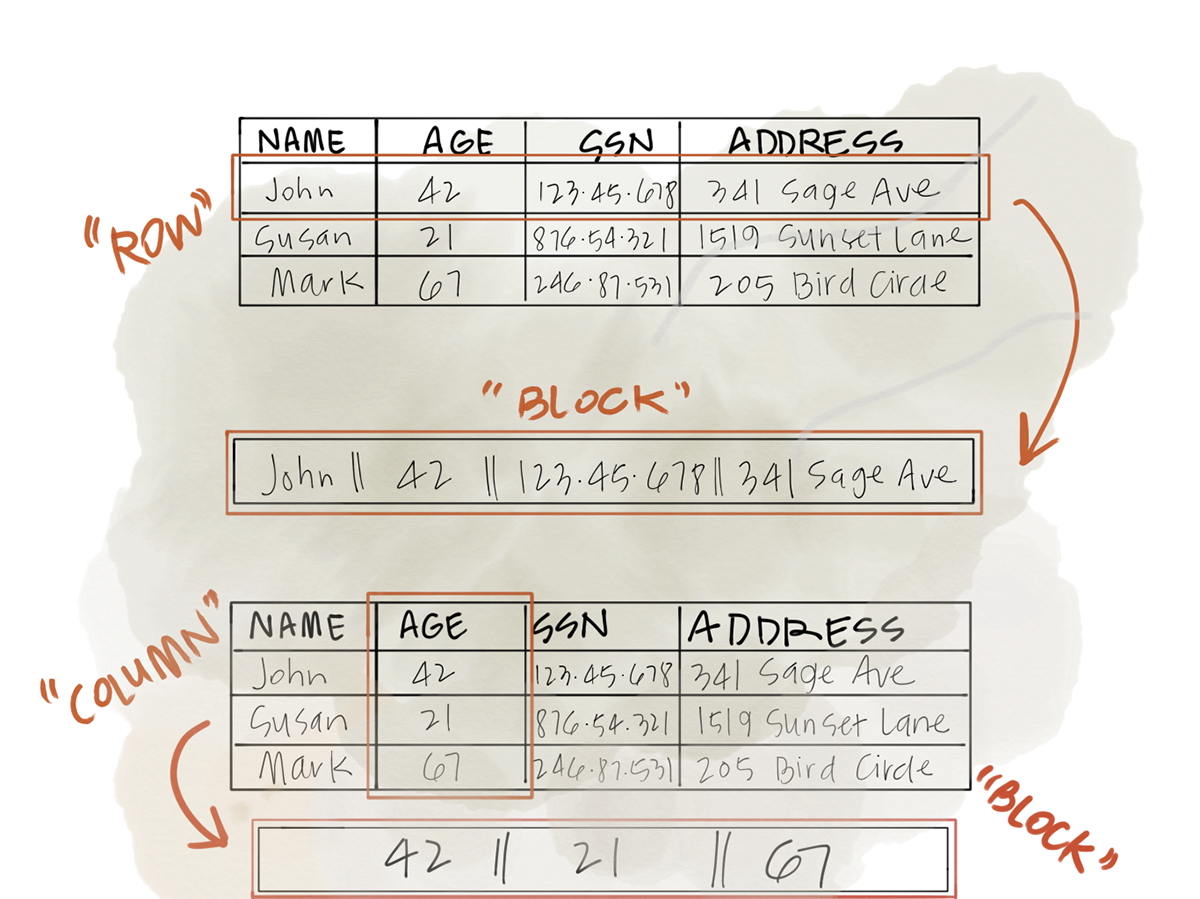
Avro is a distributed file format that is row-based and is useful for streaming workflows because it compresses records for distributed data processing.

Parquet

Parquet is a columnar-oriented file format that is designed for efficient reads when only a subset of columns are being accessed for an operation, such as when using Spark SQL.

ORC

ORC is another columnar format, it can support improved compression at the cost of additional computing cost

In [ ]: