I use db/store-sales-time-series-forecasting_training.csv which sales were avalable from 2016-08-01 until 2017-07-31 and insert to BigQuery in Console by uploading CSV file.
Dataset ID = store_sales
Table ID = simplified_data_table
import os
os.environ['GOOGLE_APPLICATION_CREDENTIALS'] = 'newacc_gcp_credential.json'
query = """
SELECT date, store_nbr, family, sales, onpromotion
FROM `scalable-model-piplines.store_sales.simplified_data_table`
limit 100
"""
from google.cloud import bigquery
client = bigquery.Client()
train_data = client.query(query).to_dataframe()
train_data.head()
| date | store_nbr | family | sales | onpromotion | |
|---|---|---|---|---|---|
| 0 | 2016-08-03 | 1 | PERSONAL CARE | 200.000 | 0 |
| 1 | 2016-08-04 | 1 | PRODUCE | 1909.962 | 0 |
| 2 | 2016-08-07 | 1 | PRODUCE | 1016.462 | 0 |
| 3 | 2016-08-09 | 1 | PRODUCE | 2044.128 | 0 |
| 4 | 2016-08-14 | 1 | PERSONAL CARE | 47.000 | 0 |
A full code for demonstration of Model Trainer is in /demo-code/prediction_service/model_trainer.py
After getting DB from BigQuery, we do Feature Engineering with supporting Seasonality.
Fit the model and temporarily save the trained model and its information to tmp/ directory.
Upload the trained model to Google Cloud Storage using gcsfs library
def upload_File_to_Cloud_Storage(src_dir: str, gcs_dst: str, recursive=False):
fs = gcsfs.GCSFileSystem()
fs.put(src_dir, gcs_dst, recursive=recursive)
bucket_name = "gcs://scalable-model-piplines-trained_model/"
upload_File_to_Cloud_Storage(path + model_name + today,
bucket_name + model_name + today, recursive=True)
upload_File_to_Cloud_Storage(path + dp_name + today + '.pkl',
bucket_name + dp_name + today + '.pkl')
I assume the model is trained every day, so the file name of the model would be in a format of "sale_forecasting_sklearn" + "today", for example, sale_forecasting_sklearn2023-02-28
We can specify the model version or overwrite the previous model to make it persistent and consistent.
We also ensure the model was trained properly and accurately before moving to production. We also run some services to double-check the model and send alerts to developers about any rising issues. Cross-check is a good practice to ensure everything is going well.
$ docker image build -t "prediction_service" .
$ docker run -d -p 8080:80 prediction_service
$ docker tag prediction_service us.gcr.io/scalable-model-piplines/prediction_service
$ docker push us.gcr.io/scalable-model-piplines/prediction_service
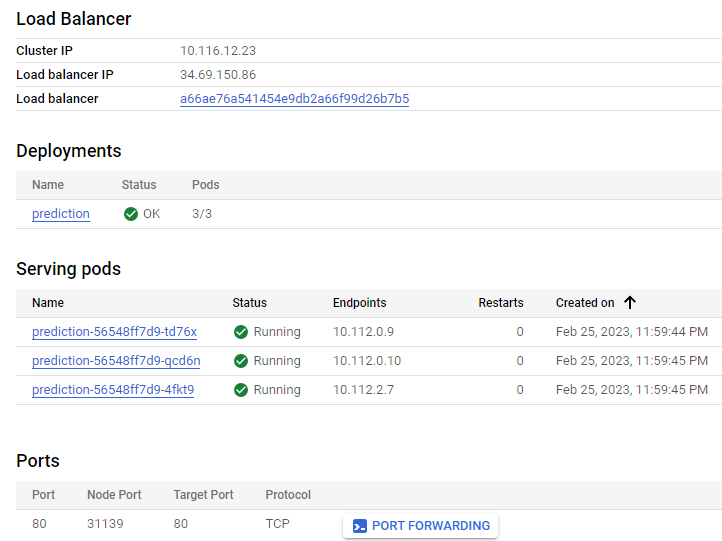
Now we can deploy this image in Google Kubernetes Engine, expose it with load balancer, and map the port to 80.

import requests
result = requests.get("http://34.69.150.86/run")
print(result.json())
{'success': True}
Now the Model Trainer can be called via HTTP Web Endpoint in the demonstration.
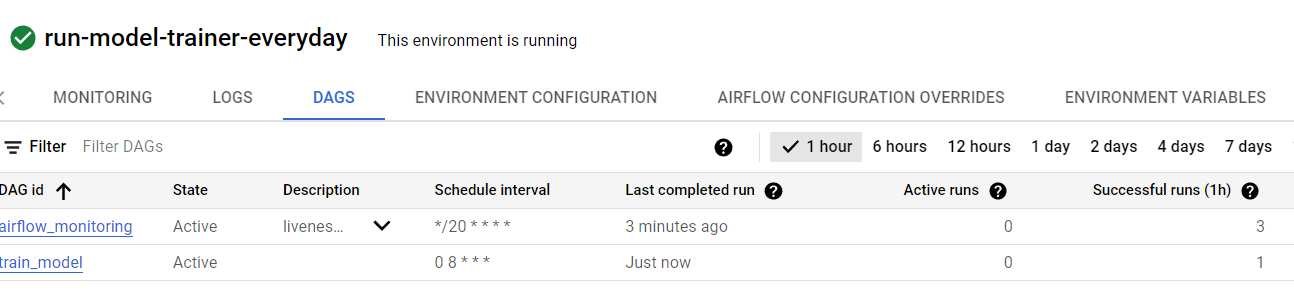
Cloud Composer¶After running the GKE of Model Trainer, we set up a schedule to run this service every day at 00:00 AM. It is possible to self-host Airflow on Kubernetes, but it can be complex to set up. There are also fully-managed versions of Airflow available for cloud platforms such as Cloud Composer on GCP.
Enable Google Cloud Composer API and create a new Environment named run-model-trainer-everday.
Add DAG to GKE cluster which runs Model Trainer. In Cloud Composer UI >> select Composer cluster >>
For the purpose of demonstration, we call Model Trainer via HTTP Web Endpoint. Below is the snippet code of task1_run_Model_Trainer.py
def main():
import requests
result = requests.get("http://34.69.150.86/run")
However, Cloud Composer can do so much more. For example, it can run a Python app to build and train a model, then run another (Python) app to either deploy the trained model to a storage or containerize it to a Docker image.
GCP provides Cloud Build to run a job to build and push the Docker image to Artifact Registry.
Cloud Composer runs and manages scripts in a bucket of Google Storage. In this case, it's us-west1-run-model-trainer--5f3a0641-bucket
us-west1-run-model-trainer--5f3a0641-bucket/
dags/
train_model.py
tasks/
task1_run_Model_Trainer.py
task2_upload_Model.py
The template for train_model.py is
from datetime import datetime, timedelta
from airflow.models import DAG
from airflow.operators.python_operator import PythonOperator
from tasks import task1_run_Model_Trainer, task2_upload_Model
default_dag_args = {}
with DAG(
dag_id="train_model",
default_args=default_dag_args,
start_date=datetime(2023, 2, 25, 0, 0),
# schedule_interval=timedelta(days=1), # every day
# At 08:00 AM every day
schedule_interval="0 8 * * *",
) as dag:
do_stuff1 = PythonOperator(
task_id="task_1",
python_callable=task1_run_Model_Trainer.main, # entrypoint is main()
)
do_stuff2 = PythonOperator(
task_id="task_2",
python_callable=task2_upload_Model.main, # assume entrypoint is main()
)
do_stuff1 >> do_stuff2
To make two actions sequential, we use ">>", for example do_stuff1 >> do_stuff2
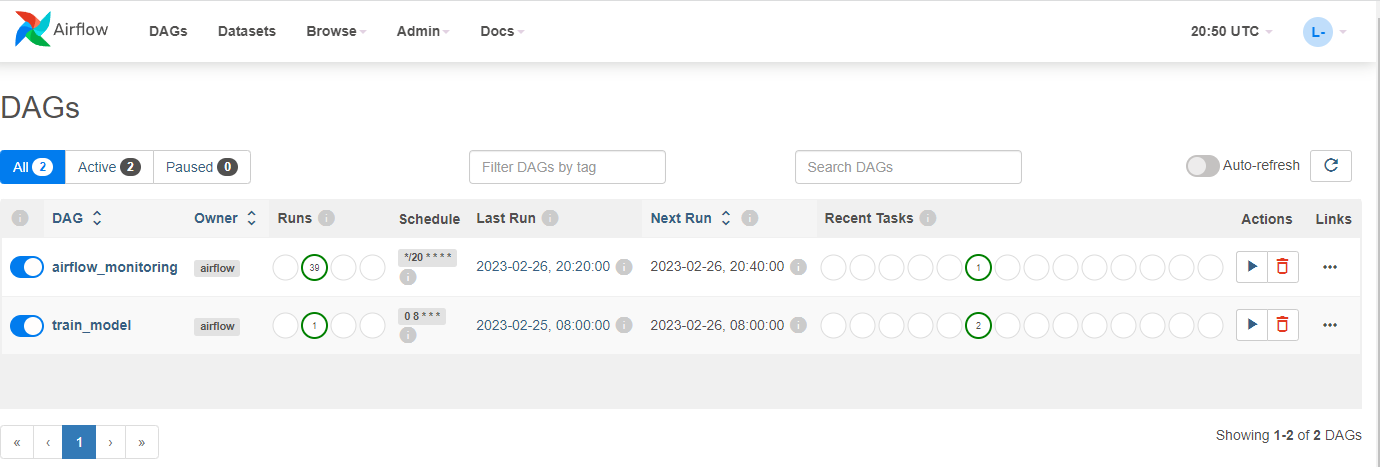
Right after putting train_model.py into dags folder in Google Storage bucket of Cloud Composer, Cloud Composer updates the new DAG and runs it if needed.

Cloud Composer also supports UI for Airflow:

In case of very large records in BigQuery, we can do batch training by feed the model batch by batch. BigQuery supports Batch query jobs. The demo code:
job_config = bigquery.QueryJobConfig(
priority=bigquery.QueryPriority.BATCH
)
query_job = client.query(sql, job_config=job_config) # Make an API request.
while(query_job.state != 'DONE'):
# DO Somthing
query_job = client.get_job(
query_job.job_id, location=query_job.location
) # Make a next API request.
There are several Python libraries which support batching.
If the model built with Tensorflow and needs query data from BigQuery, we can use tfio.bigquery.BigQueryClient.
Besides general cloud environments, GCP provides AI Platform Training to run TensorFlow, scikit-learn, and XGBoost training applications in the cloud. AI Platform Training provides the dependencies required to train machine learning models using these hosted frameworks in their runtime versions. Additionally, we can use custom containers to run training jobs with other machine learning frameworks.
AI Platform Training strongly supports distributed training with TensorFlow.
Dataproc is a fully managed and highly scalable service for running Apache Hadoop, Apache Spark, Apache Flink, Presto, and 30+ open source tools and frameworks. Use Dataproc for data lake modernization, ETL, and secure data science, at scale, integrated with Google Cloud, at a fraction of the cost.
MLlib contains many algorithms including:
This code below is pyspark-training-model/run_trainning.py
import time
from pyspark.context import SparkContext
from pyspark.ml.linalg import Vectors
from pyspark.ml.regression import LinearRegression
from pyspark.sql.session import SparkSession
def vector_from_inputs(r):
"""Define a function that collects the features of interest
(date, store_nbr, and family) into a vector.
Package the vector in a tuple containing the label (`sales`) for that row.
"""
return (
float(r["sales"]),
Vectors.dense(
time.mktime(r["date"].timetuple()),
float(r["store_nbr"]),
),
)
sc = SparkContext()
spark = SparkSession(sc)
# Read the data from BigQuery as a Spark Dataframe.
sales_data = (
spark.read.format("bigquery")
.option("project", "scalable-model-piplines")
.option("table", "store_sales.simplified_data_table")
.load()
)
# Create a view so that Spark SQL queries can be run against the data.
sales_data.createOrReplaceTempView("sales_data")
query = """
SELECT date, store_nbr, family, sales
FROM `sales_data`
"""
clean_data = spark.sql(query)
# Create an input DataFrame for Spark ML using the above function.
training_data = clean_data.rdd.map(vector_from_inputs).toDF(
["label", "features"]
)
training_data.cache()
# Construct a new LinearRegression object and fit the training data.
lr = LinearRegression(maxIter=5, regParam=0.2, solver="normal")
model = lr.fit(training_data)
# Print the model summary.
print("Coefficients:" + str(model.coefficients))
print("Intercept:" + str(model.intercept))
print("R^2:" + str(model.summary.r2))
model.summary.residuals.show()
Dataproc¶To run this Python code, we need to submit it as job to the Dataproc service.
Copy the code file (run_trainning.py) to a bucket amd get its full path file (gs://scalable-model-piplines-dataproc-model-trainer/run_trainning.py)
In the main page of Dataproc UI, choose SUBMIT JOB
Select PySpark as the Job type and insert the link of the Python file.
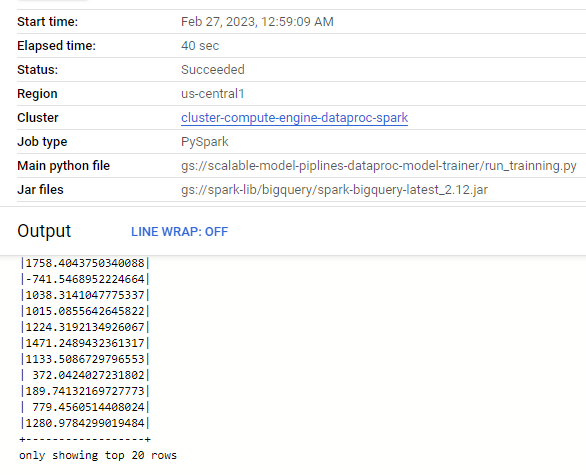
To use BigQuery service, we need to add spark-bigquery-connector: Insert gs://spark-lib/bigquery/spark-bigquery-latest_2.12.jar in the Jar files field.
If nothing wrong, we will get a status of success.

It is possible to use Cloud Composer to schedule jobs in Dataproc by running Dataproc Serverless workloads. A guideline was provided here.
It's also possible to dynamically create DataProc cluster using Cloud Composer to schedule a job and once the job is finished how we can decommission the cluster automatically.
Dataflow is a tool for building data pipelines that can run locally or scale up to large clusters in a managed environment. We briefly talked about it in the last Chapter.
Now we will use Apache Beam to build a Predicting Service in the Google Cloud Dataflow environment
DoFn¶Below is a template of how we define a class of DoFn to predict each row (element) from data (for example, loaded from BigQuery). Because it separates the whole data, it can scale up to a massive processing data pipeline.
import apache_beam as beam
class ApplyDoFn(beam.DoFn):
def __init__(self):
self._model = None
def process(self, element):
if self._model is None:
self._model = LOAD_MODEL
new_x = TRANSFORM(element)
prediction = self._model.predict(new_x)[0]
return [ { 'guid': element['guid'], 'prediction': prediction } ]
predictions = data | 'Apply Model' >> beam.ParDo(ApplyDoFn())
Now we can save the prediction results anywhere, it could be another table of BigQuery or a NoSQL DB such as Google Cloud Datastore
Cloud Datastore¶class PublishDoFn(beam.DoFn):
def __init__(self):
from google.cloud import datastore
self._ds = datastore
def process(self, element):
client = self._ds.Client()
entity = self._ds.Entity(client.key())
entity['prediction'] = element['prediction']
entity['time'] = element['time']
client.put(entity)
predictions | 'Create entities' >> beam.ParDo(PublishDoFn())
To create a workflow with Beam, we use the pipe syntax in Python to chain different steps together. The result is a DAG of operations to perform that can be distributed across machines in a cluster.
# define the pipeline steps
p = beam.Pipeline(options=pipeline_options)
data = p | 'Read Data' >> beam.io.Read(DATA_SOURCE)
scored = data | 'Apply Model for Each Element/User' >> beam.ParDo(ApplyDoFn())
scored | 'Save to BigQuery' >> beam.io.Write(beam.io.WriteToBigQuery(
'prediction_Table', 'dataset_ID', schema = schema,
create_disposition=beam.io.BigQueryDisposition.CREATE_IF_NEEDED,
write_disposition=beam.io.BigQueryDisposition.WRITE_APPEND))
scored | 'Save to Other DB like Datastore' >> beam.ParDo(PublishDoFn())
# run the pipeline
result = p.run()
result.wait_until_finish()